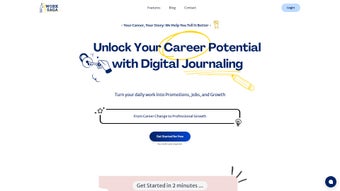

Download WorkSaga – AI Career Growth Tool, Job Promotion Assistant, Portfolio Builder
Overview
WorkSaga is an AI‑powered career companion built specifically for IT professionals who want to turn everyday project work into measurable career progress. By linking the tasks you complete, the skills you acquire, and the outcomes you deliver, WorkSaga creates a living portfolio that speaks the language of hiring managers, recruiters, and internal promotion committees. The platform lives in the cloud, which means you can access it from any device—whether you’re on a Windows workstation, a macOS laptop, an Android phone, or an iPhone. Its core engine continuously analyses your input, matches it against industry‑standard frameworks (such as SFIA and the ACM Computing Competency Model), and surfaces actionable insights: the next certification that will boost your market value, a promotion path within your current organization, or a job opening that aligns with your recent achievements. In short, WorkSaga transforms the routine of logging work into a strategic, data‑driven career‑planning experience.
Why AI Makes a Difference
The artificial intelligence behind WorkSaga does more than just count lines of code or tally tickets resolved. It understands context, categorises achievements by impact, and recommends the most relevant keywords to optimise your résumé for Applicant Tracking Systems (ATS). This means you spend less time polishing documents and more time delivering results. Moreover, the AI learns from your career goals—whether you aim for a senior architect role, a move into product management, or a freelance consulting career—and tailors the dashboard to highlight the milestones that matter most to that trajectory. By presenting a clear, evidence‑based narrative of your growth, WorkSaga helps you negotiate raises, request promotions, and confidently discuss your value during performance reviews.
Key Features
- Smart Project Capture – Import data from popular project‑management tools (Jira, Trello, Asana) or upload your CV; WorkSaga auto‑extracts tasks, technologies, and outcomes.
- Skill‑Gap Analysis – AI evaluates your current skill set against market demand and suggests targeted learning resources.
- Dynamic Portfolio Builder – Generates an online, ATS‑friendly portfolio that categorises achievements by industry frameworks.
- Career Goal Engine – Set specific milestones (e.g., “Become Lead DevOps Engineer in 12 months”) and receive weekly progress alerts.
- Job Recommendation Engine – Matches your tracked experience with open positions that fit your skill profile and career aspirations.
- Performance Review Assistant – Provides curated highlights and metrics to use in quarterly or annual reviews.
- Cross‑Platform Accessibility – Web‑based interface works on Windows, macOS, Linux, Android, and iOS browsers.
- Secure Data Handling – End‑to‑end encryption, GDPR compliance, and optional two‑factor authentication keep your career data private.
- Regular Updates & Community – Monthly AI model refinements and a user community forum for sharing best practices.
Installation & Usage Instructions
Because WorkSaga is a web‑based SaaS solution, there is no traditional “install” process. Getting started takes less than five minutes, and the steps are deliberately straightforward to keep the focus on career development rather than technical setup.
Step‑by‑Step Guide
- Create an Account – Visit worksaga.com and click “Sign Up”. You can register using an email address or single sign‑on via Google or Microsoft Azure AD.
- Verify Your Identity – A verification email is sent; click the link to activate your account. For added security, enable two‑factor authentication in the account settings.
- Connect Your Tools – In the “Integrations” tab, link your preferred project‑management platforms (Jira, Azure DevOps, Trello, Asana). WorkSaga will request read‑only API tokens, ensuring your data remains safe.
- Import Existing CV/Portfolio – Upload a PDF or Word version of your résumé. The AI scans the document, extracts roles, technologies, and achievements, and populates the dashboard.
- Define Career Goals – Use the “Goals” wizard to set short‑term (3‑6 months) and long‑term (1‑3 years) objectives. Choose from predefined templates (promotion, certification, role change) or craft custom goals.
- Start Logging Work – Manually add entries or let the integrations auto‑populate. For each entry, tag the technology stack, impact metric (e.g., “Reduced latency by 30%”), and business outcome.
- Review Insights – The “Insights” panel displays skill gaps, recommended learning paths, and potential job matches. Export a polished portfolio or ATS‑optimised résumé with one click.
- Prepare for Reviews – In the “Performance Review” section, select a timeframe and the system generates a concise summary of your achievements, complete with visual charts.
Best Practices for Maximum Benefit
Consistency is key. Log major tasks within 24‑48 hours of completion to capture the most accurate context. Regularly revisit the “Skill Gap” analysis to stay ahead of emerging technologies such as cloud‑native architectures, AI/ML frameworks, and DevSecOps practices. Take advantage of the community forum to share your portfolio with peers for feedback, and schedule a quarterly “Career Check‑In” with WorkSaga’s AI coach to reassess goals.
Compatibility, Pros & Cons, and Frequently Asked Questions
Supported Operating Systems
WorkSaga runs entirely in modern web browsers, making it compatible with Windows 10/11, macOS Ventura and later, Linux distributions (Ubuntu, Fedora, etc.), as well as mobile browsers on Android 9+ and iOS 13+. No additional plugins or downloads are required.
Pros
- AI‑driven insights turn everyday tasks into career‑advancing data.
- Seamless integration with popular project‑management tools saves manual entry.
- ATS‑optimised résumé generation improves job‑application success rates.
- Cross‑platform accessibility ensures you can update your portfolio from any device.
- Robust security features protect sensitive career information.
Cons
- Relies on internet connectivity; offline mode is not available.
- Advanced AI recommendations are locked behind the premium subscription.
- Initial learning curve for users unfamiliar with AI‑based career platforms.
FAQ
Is WorkSaga free to use?
WorkSaga offers a free tier that includes basic project tracking, skill analysis, and portfolio generation. Premium features such as AI‑driven job recommendations, advanced skill‑gap analysis, and unlimited integrations require a paid subscription.
How does WorkSaga protect my personal data?
All data is encrypted in transit (TLS 1.3) and at rest (AES‑256). The platform complies with GDPR and CCPA regulations, and users can enable two‑factor authentication for added security.
Can I import data from existing CVs or LinkedIn?
Yes. WorkSaga can parse PDF, DOCX, and plain‑text résumés. It also offers a LinkedIn connector that pulls your profile data (with your permission) to seed the initial portfolio.
Does WorkSaga work on mobile devices?
The responsive web interface is fully functional on Android and iOS browsers. You can log projects, review insights, and generate résumé PDFs directly from your smartphone.
What kind of career recommendations does the AI provide?
The AI analyses your skill inventory, recent project outcomes, and stated goals to suggest relevant certifications, internal promotion tracks, and external job openings that match your profile. Recommendations are refreshed weekly based on market trends.
Conclusion & Call to Action
In a fast‑evolving tech landscape, the ability to demonstrate concrete value and a clear growth trajectory is more important than ever. WorkSaga bridges the gap between daily execution and strategic career planning by turning every line of code, every deployment, and every sprint into quantifiable evidence of your professional ascent. Whether you’re a junior developer aiming for a senior role, a seasoned architect eyeing a leadership position, or a freelance consultant seeking higher‑paid contracts, the AI‑driven insights, ATS‑optimised résumé builder, and personalized job recommendations give you a competitive edge that traditional résumé tools simply cannot match.
Ready to transform your everyday work into a powerful career narrative? Sign up for WorkSaga’s free tier today and start building the portfolio that gets you noticed. Upgrade to the premium plan when you’re ready to unlock advanced AI recommendations and unlimited integrations—because your career growth should never be limited by manual tracking.
WorkSaga delivers a compelling blend of AI analytics and practical usability. The automated portfolio generation alone saves hours each week, while the skill‑gap analysis provides clear, actionable learning paths. The only drawback is the lack of an offline mode, but for most professionals who work in the cloud, this is a minor trade‑off.



.png)



